GU10 LED Bulb Flickering: Causes, Dimmer Checks and Reliable Fixes
Updated: September 10, 2026
GU10 LED bulbs usually flicker because the dimmer, LED driver and circuit load do not operate reliably together. Flicker may appear only at low brightness, across the full range or after the lamp warms up. Before replacing a whole project, test the dimmer type, minimum and maximum load, lamp quantity, wiring, supply stability and the exact GU10 sample in the real fixture.
| Symptom | Likely check | Practical action |
|---|---|---|
| Flickers only when dimmed low | Minimum load or low-end driver control | Raise the trim level or test a compatible LED dimmer |
| Flickers at every level | Driver, wiring or supply instability | Test one known-good lamp and inspect the circuit |
| Stable when cold, unstable when warm | Thermal stress or driver quality | Check fixture ventilation and compare qualified samples |
For B2B retrofits, approve the lamp and dimmer as a tested system. A “dimmable” label alone does not confirm stable operation across every dimmer or load.

Si alguna vez te has encontrado en una habitación con poca luz y luces parpadeantes, sabes lo frustrante que puede ser. ¡Descifremos este misterio juntos!
Las bombillas LED GU10 parpadean al regularse principalmente debido a la incompatibilidad entre el regulador y la bombilla, controladores defectuosos, conexiones eléctricas deficientes o problemas con la calidad de la energía.
Entender por qué tus bombillas LED parpadean no es solo un problema técnico; se trata de crear una atmósfera acogedora en tu hogar. ¡Profundicemos en los detalles y descubramos las soluciones!
✔ Verdadero
Los reguladores incompatibles no pueden manejar la baja potencia del LED, causando parpadeo.
¿Qué Causa la Incompatibilidad entre Regulador y Luminaria?
La incompatibilidad entre regulador y luminaria puede llevar a parpadeo en sistemas de iluminación LED. Pero ¿por qué sucede esto y cómo puede prevenirse?
La incompatibilidad entre el regulador de intensidad y la luminaria ocurre cuando el interruptor regulador no es compatible con los requisitos de potencia del LED, causando parpadeo. Las soluciones incluyen el uso de reguladores compatibles con LED o ajustar la carga con luminarias de mayor potencia o cargas ficticias.
Entendiendo la Compatibilidad con Dimmers
Los reguladores originalmente diseñados para bombillas halógenas o incandescentes pueden no funcionar bien con LED. Estos reguladores tradicionales típicamente requieren una carga de potencia mínima más alta de la que los LED proporcionan. Por ejemplo, un regulador estándar puede necesitar al menos 200W para funcionar correctamente, mientras que la mayoría de las luminarias LED consumen solo entre 3W y 7W. Esta disparidad conduce a corriente insuficiente, causando parpadeo. Para resolver esto, considere cambiar a un regulador que admita luminarias LED de baja potencia o agregar más carga al circuito integrando luminarias adicionales o cargas ficticias.
Explorando las Características de la Regulación Triac
Muchos reguladores convencionales utilizan tecnología de tiristores, que depende de mantener un flujo de corriente constante. Sin embargo, los LED a menudo no logran sostener la corriente necesaria debido a su baja potencia. Esto resulta en un rendimiento de regulación inconsistente y parpadeo. Al optar por un atenuador diseñado específicamente para LED1, puedes eliminar estos problemas, asegurando una salida de luz suave y estable.
Adaptándose a la Variabilidad del Controlador LED
En algunos casos, la incompatibilidad surge de la incapacidad del controlador LED para manejar los requisitos del regulador de intensidad. El controlador es crítico ya que convierte CA a CC y regula la corriente. Si está defectuoso o sobrecargado, puede ocurrir parpadeo. Una solución robusta implica seleccionar un driver LED compatible tanto con la luminaria como con el atenuador. Para más información sobre optimizar el rendimiento del driver, explorar opciones de driver adecuadas2.
Estudio de Caso: Ajuste de Carga
Para ilustrar, considere un escenario donde un regulador requiere una carga mínima de 50W, pero el LED conectado solo consume 10W. Agregar otros 40W de carga, ya sea a través de luces adicionales o una carga ficticia, puede estabilizar el sistema. Así es como podría verse una posible configuración de ajuste de carga:
| Componente | Consumo de Energía |
|---|---|
| Bombilla LED 1 | 10W |
| Bombilla LED 2 | 20W |
| Carga Ficticia | 20W |
| Total | 50W |
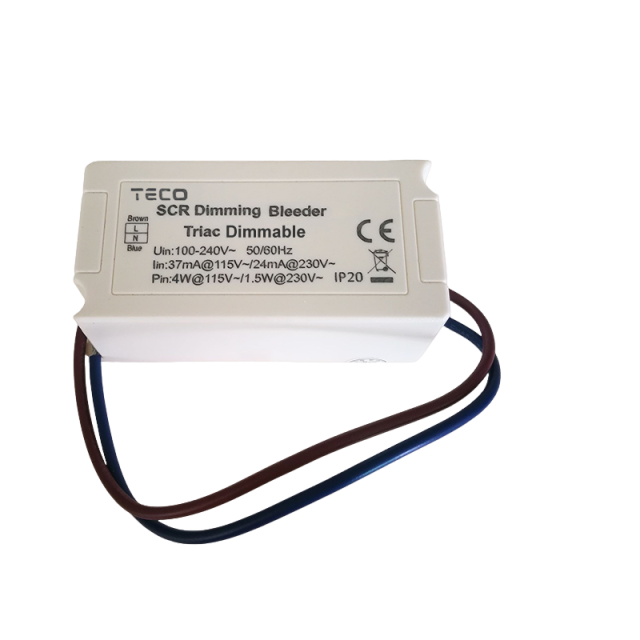
La Carga Ficticia también está disponible en Tecolite, Carga Ficticia El principio de funcionamiento es que cuando el regulador de intensidad se ajusta al extremo bajo, comienza a funcionar, su potencia es generalmente de unos 4W, cuanto menor es el voltaje, mayor es la amplitud de apertura, de modo que el regulador puede estabilizar la salida de corriente, reduciendo así el parpadeo del regulador.
Esta tabla demuestra cómo la combinación de múltiples componentes puede satisfacer el requisito de carga mínima del atenuador, reduciendo así el potencial de parpadeo.
❌ Falso
Los reguladores tradicionales necesitan cargas de potencia más altas de las que los LED proporcionan, causando problemas.
✔ Verdadero
Los reguladores compatibles con LED coinciden con los requisitos de baja potencia, asegurando una iluminación estable.
¿Cómo Pueden los Problemas del Driver Afectar a las Bombillas LED?
Las bombillas LED son elogiadas por su eficiencia energética, pero los problemas del driver pueden llevar a problemas como el parpadeo.
Los problemas del driver afectan a las bombillas LED al causar una regulación de energía inconsistente, lo que lleva a parpadeos y rendimiento reducido. Asegurar que el driver sea compatible y funcione correctamente puede mitigar estos problemas.
Comprendiendo el Rol de los Controladores LED
Los controladores LED son integrales para el funcionamiento de las bombillas LED. Su función principal es convertir la corriente alterna (CA) de su fuente de alimentación en corriente continua (CC), que es necesario para que los LED funcionen de manera eficiente. Los drivers también ayudan a regular la cantidad de electricidad que fluye a través del LED para garantizar un brillo y rendimiento consistentes.
A malfunctioning driver can result in irregular power flow, causing the bulb to flicker or even fail prematurely.
Common Driver Issues in LED Bulbs
- Overloading: When drivers are overloaded, they struggle to maintain a stable current, leading to flickering or dimming. This can happen if a driver is designed for a lower wattage than the total demand of the LED lights connected.
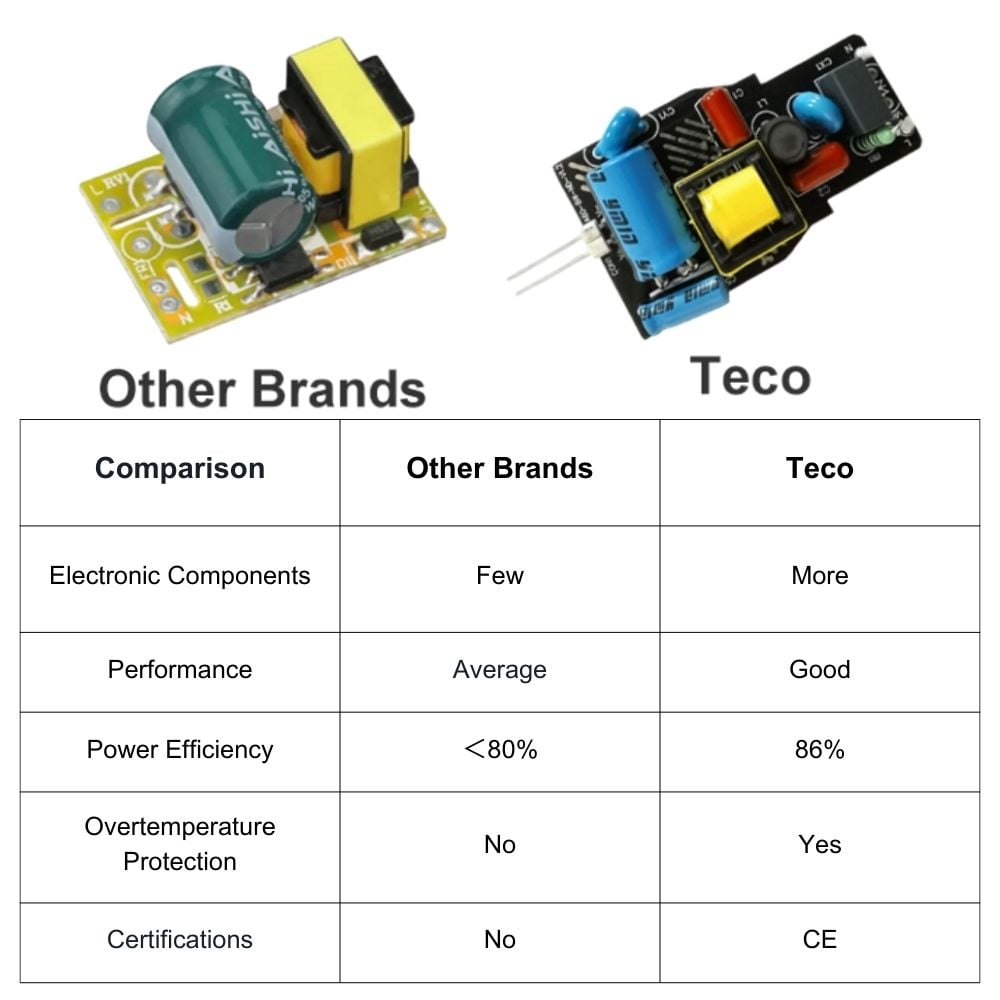
- Defective Drivers: Sometimes, drivers may be inherently faulty or degrade over time due to heat and other environmental factors. A defective driver will not regulate power effectively, resulting in flickering and inconsistent light output.
Identifying and Solving Driver Problems
Symptoms of Driver Issues
- Flickering Light: Intermittent flickering often points to problems with power regulation by the driver.
- Inconsistent Brightness: A sign that the driver may not be providing a steady current.
- Premature Failure: If LEDs burn out quickly, it could be due to improper current regulation.
Solutions for Driver Problems
- Replacement: One of the simplest solutions is to replace the driver with one compatible with the specific LED bulb’s power requirements.
- Ensuring Compatibility: Verify that the driver’s wattage and voltage specifications match those of your LED bulbs.
- Regular Maintenance: Periodic checks and maintenance can catch potential issues early. Ensure connections are secure and inspect for any signs of damage or wear.
The Importance of Quality Drivers
Using quality drivers designed specifically for LED bulbs is crucial. These are built to handle the low wattage and specific electrical characteristics of LEDs, thereby reducing the risk of issues like flickering. Investing in high-quality drivers not only prolongs the life of your bulbs but also ensures a stable lighting experience.
Consulting with an electrical expert or exploring online resources3 can provide additional guidance on selecting and maintaining suitable drivers for your lighting needs.
✔ Verdadero
LED drivers convert AC from power supply to DC, essential for LEDs.
✔ Verdadero
Overloading causes unstable current, leading to flickering in LEDs.
Why Is a Strong Connection Important for LED Lights?
Ensuring a robust electrical connection is key to preventing flickering and prolonging the lifespan of your LED lights.
A strong connection between LED lights and their power source prevents flickering and ensures stable light output. This is crucial as poor connections can lead to intermittent contact, causing disruptions in the electrical flow and affecting the overall performance and longevity of LED fixtures.
Understanding the Role of Electrical Connections
In the world of LED lighting, electrical connections serve as the lifeline for your fixtures. They allow the seamless flow of electricity from your power source to the bulb, enabling it to produce consistent and reliable light output. When these connections are weak or improperly secured, they can cause a range of issues from flickering to complete failure.
Common Issues with Weak Connections
Intermittent Contact
A common issue caused by a poor connection is intermittent contact. This occurs when the electrical connection is not consistently maintained, leading to sporadic disruptions in current flow. Such interruptions can cause flickering or even temporary outages in your LED lighting setup.
Reduced Efficiency
Weak connections can also lead to increased resistance within the circuit. This increased resistance can result in energy loss, making your LED fixtures less efficient. Over time, this inefficiency can lead to higher energy bills and a reduced lifespan for your bulbs.
Solutions for Strengthening Connections
Regular Maintenance
Regular checks and maintenance of electrical connections can prevent issues before they arise. This involves tightening any loose connections and replacing any worn-out components.
Professional Installation
For larger installations or when in doubt, consulting with a professional can ensure that all connections are secure and meet industry standards. Proper installation4 not only prevents flickering but also optimizes the overall performance of your lighting system.
Componentes de calidad
Investing in quality connectors and wiring can make a significant difference. High-quality components are more durable and reliable, offering better protection against common issues like corrosion or mechanical wear.
In conclusion, maintaining strong electrical connections is crucial for optimal LED performance. By ensuring secure connections, you mitigate the risk of flickering and extend the lifespan of your lighting fixtures, saving both time and money in the long run.
✔ Verdadero
Weak connections disrupt electrical flow, leading to flickering issues.
❌ Falso
Quality components enhance efficiency by reducing resistance and energy loss.
How Does Power Quality Impact Flickering?
Understanding the relationship between power quality and flickering can help you achieve stable lighting.
Power quality impacts flickering through voltage fluctuations, electrical noise, and harmonics. These disturbances can cause LED GU10 bulbs to flicker by affecting the consistent flow of electricity. Ensuring a stable power supply can minimize these issues.
Voltage Fluctuations and Their Effects
Voltage fluctuations are a common issue that can affect the performance of LED lights, leading to flickering. These fluctuations occur when there is a sudden change in the voltage level of the electrical supply, often caused by high-power devices starting up or shutting down. For example, turning on an air conditioner can momentarily reduce the voltage available to other devices, such as your LED GU10 bulbs.
To mitigate this, consider installing a voltage stabilizer or using an uninterruptible power supply (UPS) to maintain a consistent voltage level. Understanding voltage fluctuation solutions5 can provide insights into the best options for your home.
The Role of Electrical Noise
Electrical noise refers to any unwanted disturbances that affect the quality of the electrical supply. Sources of electrical noise include electromagnetic interference from other devices and poor grounding. This noise can lead to irregular light output from LEDs, resulting in flickering.
To reduce electrical noise, ensure that your wiring is properly shielded and grounded. Additionally, using filters or line conditioners can help minimize interference. Learn more about reducing electrical noise6 in your lighting system.
Harmonics and Their Impact on LEDs
Harmonics are voltage or current waveforms at multiples of the fundamental frequency (usually 50 or 60 Hz) that can distort the overall electrical signal. These distortions are particularly problematic for LED lighting systems as they rely on a steady current to maintain a consistent light output.
Installing harmonic filters can be an effective way to eliminate these distortions and ensure that your LED bulbs operate smoothly without flickering. Exploring harmonic filter solutions7 can guide you toward the right choice for your setup.
✔ Verdadero
Sudden voltage changes affect LED power stability, causing flickering.
❌ Falso
Harmonics distort electrical signals, affecting LED light stability.
Conclusión
By understanding the causes of flickering LED GU10 bulbs and implementing the right solutions, you can enjoy stable lighting and a more inviting atmosphere at home.
💡 Recommended Flicker-Free GU10 Solutions
Based on the technical causes discussed above, we have selected 5 top-performing GU10 bulbs from our professional range to help you eliminate flickering for good.
| Modelo de producto | Best For… | Why it solves flickering |
|---|---|---|
| TECO Premium GU10 Pro (8W / Ra98) | High-End Interiors | High 8W power ensures it meets the minimum load of most dimmers while providing museum-grade light. |
| GU10 Dimmable LED Bulb (0–100% Smooth Dimming) | Universal Compatibility | Specifically engineered with a Triac-compatible driver for a flicker-free, ultra-smooth dimming range. |
| Teco Premium GU10 7.5W 24Vdc PWM Dimmable | Professional Projects | Uses a CC power supply to bypass CA voltage fluctuations—the ultimate physical solution to flicker. |
| TECO Premium GU10 Dim-to-Warm | Cozy Atmosphere | Features an intelligent driver that stabilizes current while shifting color temperature, ensuring no flicker at low levels. |
| Teco Premium GU10 10° Narrow Beam (7.5W, CRI 98) | Accent Lighting | A stable 7.5W load combined with a premium driver design, perfect for focused, flicker-free spotlighting. |
Consejo profesional: Still experiencing flickering? Your dimmer may require a Tecolite Dummy Load to stabilize the circuit current.
Contact our lighting experts today for a free compatibility check of your dimming system!
Discover the benefits of using dimmers designed specifically for LED fixtures.: Lutron Diva LED+ Dimmer Switch for Dimmable LED and Incandescent Bulbs, 150-Watt/Single-Pole or 3-Way, White (DVCL-153PR-WH) ↩
Learn how to choose the right driver for your LED setup.: Another way to establish LED driver compatibility is to contact LED driver manufacturers who may publish compatibility data. ↩
Learn to select compatible drivers for optimal LED bulb performance.: How to Choose an LED Driver · Know the Type and Number of LED Lights in the Setup · Check the Milliamp Rating of Your LEDs · Check the Wattage of the LED Driver. ↩
Professional installation ensures secure connections, preventing flickering and enhancing LED performance.: Professional Installs Ensure Quality: Professionally installed LED lights are far less likely to fail or require repairs in the future. This means you can enjoy … ↩
Discover ways to stabilize voltage and prevent flickering issues.: Automatic Voltage Regulators stabilise incoming voltage supplies to suit your facility’s exact needs – with eagle eye precision. And because … ↩
Learn methods to minimize electrical noise impacting LEDs.: Capacitive coupling · Properly grounding instruments and equipment according to manufacturer’s instructions · Routing sensing and control circuits … ↩
Explore harmonic filters to prevent flickering due to waveform distortion.: Power: Harmonic filtering saves electricity, but usually the savings alone do not justify the investment (over 3% without calculating the losses of the filter … ↩