
スマートホームシステムに調光可能LED電球を統合する方法は?
最終更新日:2026年2月2日
Integrating 調光可能なLED電球 into a smart home system can significantly enhance lighting intelligence, convenience, and everyday comfort. Below is a practical, step-by-step guide to help you achieve seamless smart lighting integration.
Select Compatible Dimmable LED Bulbs
Start by choosing dimmable LED bulbs that are compatible with smart home systems. These bulbs should support wireless communication technologies such as:
- Wi-Fi
- Bluetooth (BLE)
- Zigbee
- Z-Wave
This connectivity allows the bulbs to communicate with a smart home hub or directly with a smartphone app.
Ensure You Have a Suitable Smart Home Hub
Most smart home systems rely on a central hub to coordinate devices. Ensure your hub supports the dimmable LED bulbs you plan to use.
Common smart home hubs include:
- Amazon Echo
- Google Home
- Apple HomeKit
The hub should be able to communicate with your bulbs via the supported wireless protocol.
Install and Configure the Dimmable LED Bulbs
Install the bulbs according to the manufacturer’s instructions. Then configure them using your smart home hub or the dedicated mobile app.
During setup, you can:
- Assign custom names to bulbs
- Group bulbs by room or function
- Create preset lighting scenes

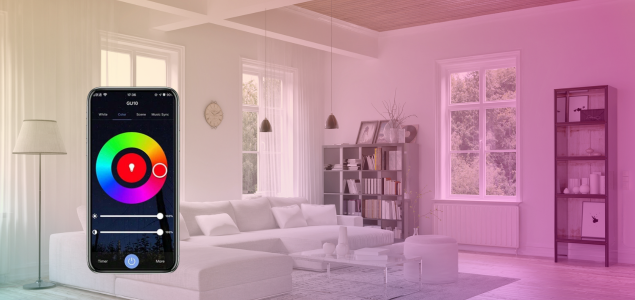
a color-changing GU10 smart bulb alongside a mobile app interface for selecting hues, brightness, and color temperature.
Integrate Bulbs Into Smart Home Scenes
Use your smart home app to integrate dimmable LED bulbs into automated scenes. Examples include:
- Movie Night: lights dim automatically for a cinema-like experience
- Wake-Up Mode: lights gradually brighten in the morning to simulate sunrise
- Relax Mode: warm, low-level lighting for evenings
Scenes allow lighting to adapt naturally to your daily routines.
Enable Voice Control and Remote Access
If your system supports voice assistants such as Alexa, Google Assistant, or Siri, you can control lighting using voice commands:
- Turn lights on or off
- Adjust brightness levels
- Activate predefined scenes
With a smartphone app, you can also control your lighting remotely, even when you’re away from home.
Consider Compatibility and Interoperability
To future-proof your smart home, choose bulbs and devices that support standard communication protocols, such as:
- Zigbee
- Z-Wave
- Bluetooth Low Energy (BLE)
This ensures smooth interoperability and minimizes compatibility issues when adding new devices later.
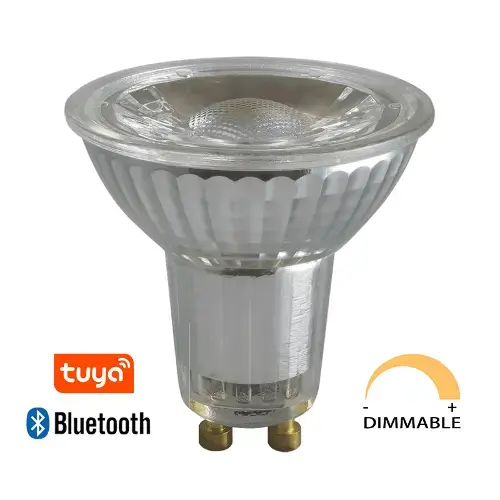
The Tecolite Smart GU10 LED bulb can be controlled via the Tuya app to adjust brightness.
Summary
By following these steps, you can successfully integrate dimmable LED bulbs into your smart home system. The result is flexible lighting control, enhanced automation, and a smarter, more comfortable living environment that adapts effortlessly to your lifestyle.
 English
 French
 German
 Italian
 Spanish
 Portuguese
 Arabic
 Russian
 Japanese
 Chinese