
Why Do Dimmable LED Bulbs Have Noise?
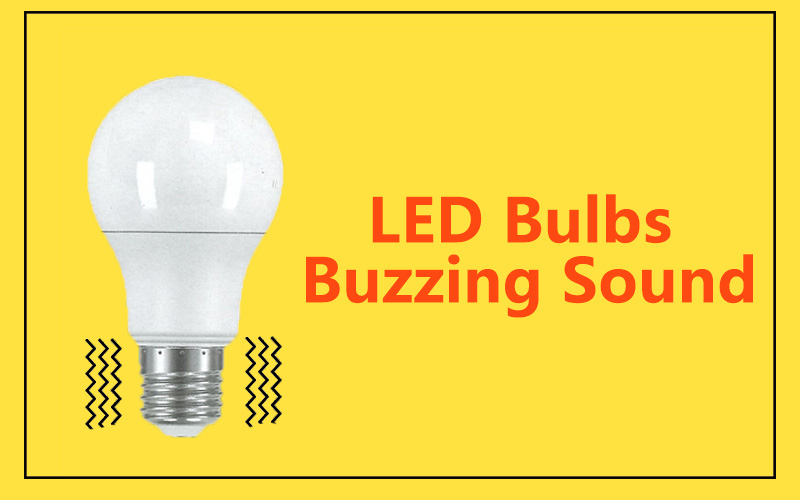
You install dimmable LED bulbs for comfort, but instead of quiet lighting, you hear buzzing or whining. This noise can be distracting in a calm home or office.
Dimmable LED bulbs produce noise because their electronic parts vibrate when powered by AC current or paired with incompatible dimmers. These vibrations create buzzing, humming, or whining within audible frequencies.
Noise does not always mean danger, but it does affect comfort and quality. Let me explain why it happens and how to manage it.
Why does a dimmable bulb make noise?
When you lower the brightness, do you hear a buzzing tone that grows as the light dims? Many people notice this.
A dimmable bulb makes noise because the AC current is chopped by a dimmer, causing inductors, capacitors, or drivers inside the bulb to vibrate.
Dive Deeper: The Physics Behind Noise
Noise exists in almost every electrical device. In LED bulbs, it comes from switching power supplies. These circuits use inductors and capacitors to convert AC to DC. During switching, magnetic cores expand and contract slightly. This vibration can fall into the 20Hz–20kHz range, which is audible to humans.
Key causes include:
- Driver design: Poor circuits fail to suppress vibration.
- Resonance frequency: When internal frequency overlaps with hearing range.
- Dimmer mismatch: Old dimmers chop the wave too harshly, stressing components.
| Cause of Noise | Why It Happens | Fix |
|---|---|---|
| Resonance frequency | Overlaps human hearing (20Hz–20kHz) | Push frequency above 20kHz |
| Incompatible dimmer | Sharp current cuts stress the driver | Use trailing-edge LED dimmer |
| Weak mechanical design | Thin housing amplifies vibration | Add silicone or foam to absorb sound |
Engineers try to design circuits that avoid audible frequencies. If they cannot, they use silicone pads, sponges, or larger surface areas to absorb vibration.
Why are my LED lights making a noise?

You switch on your LED lights and hear buzzing or humming. Why?
LED lights make noise when electronic parts inside them vibrate due to AC supply ripple or when used with incompatible dimmer switches.
Dive Deeper: Common Sources of Noise
- AC ripple current – Residual current after conversion shakes the driver.
- Loose housing – Sometimes the lamp holder or fixture vibrates.
- Overloaded circuits – Too many LEDs on one dimmer increase stress.
- Driver resonance – Switching circuits operate at audible ranges.
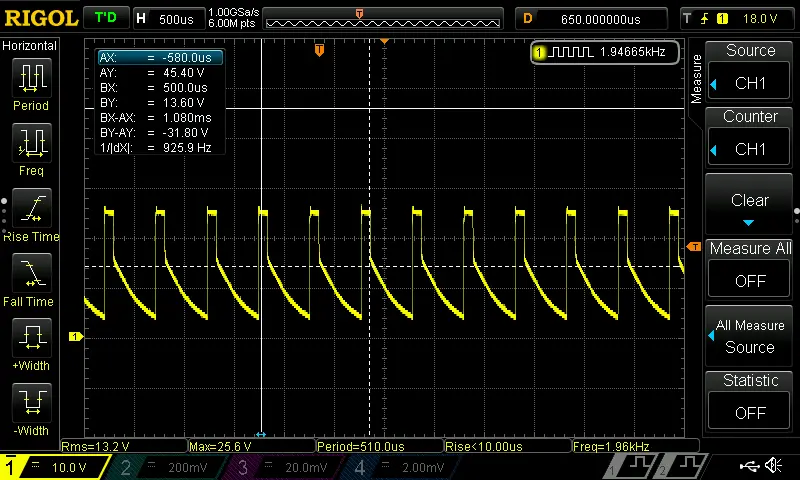
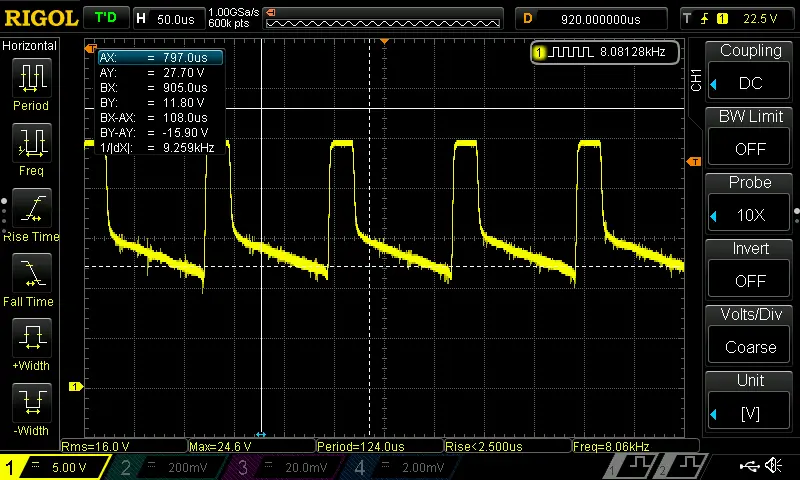
Some dimmers, especially PWM dimmers with low frequencies (around 2kHz), also generate noise. This low frequency can cause ceramic capacitors (MLCC) to vibrate. Adjusting the dimming frequency to 8kHz or above reduces both noise and flicker metrics (SVM, PstLM).
As a designer, I know not all noise comes from the bulb. Triac-based leading-edge dimmers are also noise sources due to their simple circuits. Replacing them with trailing-edge dimmers often solves the problem.
How to stop dimmer lights from buzzing?
A buzzing light can ruin a relaxing atmosphere. Can you stop it? Yes.
You can stop buzzing by using LED-compatible trailing-edge dimmers, choosing high-quality bulbs, and adjusting dimming frequencies above 8kHz.
Dive Deeper: Practical Fixes
1. Replace Old Dimmers
Leading-edge dimmers cause sharp current cuts. Trailing-edge dimmers deliver smoother signals, reducing both flicker and sound.
2. Use Certified Bulbs
High-quality bulbs include buffering materials to suppress vibration. They are also tested under standards such as Energy Star (≤30dB at 1m).
3. Adjust PWM Frequency
Low PWM dimming frequencies create noise. Raising the frequency above 8kHz avoids both audible buzzing and visual flicker.
4. Spread Load Across Circuits
Too many LEDs on one dimmer increase stress. Splitting the load reduces vibration.
| Fix Method | Difficulty | Cost Impact | Effectiveness |
|---|---|---|---|
| Replace with trailing-edge dimmer | Low | Médio | Alta |
| Buy certified bulbs | Low | Médio | Alta |
| Adjust PWM frequency | Médio | Low | Alta |
| Split load per circuit | Médio | Low | Médio |
Why is my LED power supply making a buzzing sound?

Sometimes the bulb itself is quiet, but the external driver hums.
An LED power supply buzzes because its transformer or inductor vibrates during AC-to-DC conversion, especially when frequency falls in the audible range.
Dive Deeper: Inside the Driver
The driver regulates current. Coils, capacitors, and switching chips can all vibrate. If switching frequency is too low, or filtering is weak, buzzing happens.
Typical Causes:
- Magnetic core expansion inside inductors.
- Loose coil windings acting like tiny speakers.
- Poor ripple filtering leaving unstable signals.
Design Solutions:
- Increase switching frequency above 20kHz.
- Encapsulate coils in resin or silicone.
- Strengthen housing to reduce resonance.
If your power supply buzzes loudly, it may be overloaded or poorly designed. Replacing it with a quality, quiet driver usually solves the issue.
Why does my LED make a whining sound?
Sometimes the sound is not buzzing, but a sharp high-pitched whine.
An LED whines when its driver runs near 15–20kHz, which is close to human hearing limits.
Dive Deeper: Whining Explained
Unlike buzzing (low-frequency), whining is thin and sharp. It usually comes from:
- Switching frequency overlap – Driver runs near hearing range.
- Thin casings – The bulb body amplifies high-pitched vibrations.
- Small MLCC capacitors – Ceramic capacitors vibrate at certain dimming frequencies.
Buzzing vs Whining vs Humming
| Noise Type | Frequency Range | Source | Fix Recommendation |
|---|---|---|---|
| Zumbido | 100Hz – 5kHz | Ripple, poor dimmer | Use trailing-edge dimmers |
| Humming | 50Hz – 200Hz | Transformer vibration | Replace driver, tighten components |
| Whining | 15kHz – 20kHz | Driver switching, MLCC caps | Adjust PWM >8kHz, use quality bulbs |
If your LED makes a whining sound, the best fix is to upgrade to bulbs with well-designed drivers and pair them with modern dimmers.
Conclusão
LED noise comes from vibration in drivers, capacitors, inductors, and sometimes dimmers. By using quality bulbs, trailing-edge dimmers, and correct design, buzzing and whining can be reduced below 30dB at 1m, keeping lighting both silent and comfortable.
Why I Trust Teco for Quiet LED Lighting
In my own projects, I found that not all LED suppliers take acoustic comfort seriously. Many low-cost bulbs save money on drivers, which leads to noise and flicker. At Teco, we manufacture dimmable LED spotlights with strict quality control. Our designs avoid resonance in the 20Hz–20kHz range, and we use silicone damping and advanced circuit design to minimize noise.
Because we run four production lines in China, we can supply bulk orders to large buyers while keeping consistent quality. We also provide custom logo service and rare styles that help our clients stand out in competitive markets in Europe, Saudi Arabia, UAE, USA, and Southeast Asia.
If you are a buyer like William, who cares about both quality and price, working with a factory like ours ensures that you avoid delays, unstable products, or fake certificates. You get certified, reliable, and silent LED lighting that your customers will trust.



 English
  French
  German
  Italian
  Spanish
  Portuguese
  Arabic
  Russian
  Japanese
  Chinese